Introducing Click-to-Book: One-Click Meeting Scheduling

Introducing Click-to-Book: One-Click Meeting Scheduling Made Simple
We're excited to announce Click-to-Book, Carly's feature that eliminates the final friction point in meeting scheduling: the back-and-forth to confirm a time.
The Problem: Even Simple Scheduling Takes Too Many Steps
You know the drill. Carly finds times that work and sends them to the other person:
"Here are some times that work:
- Tuesday, January 20th at 2:00 PM EST
- Wednesday, January 21st at 10:00 AM EST
- Thursday, January 22nd at 3:00 PM EST
Which works best for you?"
Then the recipient has to:
- Reply to confirm which time works
- Wait for Carly to create the calendar event
- Accept the calendar invite
That's 3 steps and multiple emails when it should be instant.
The Solution: Click-to-Book
With Click-to-Book, when Carly proposes meeting times, each option becomes a clickable booking link. Recipients click a time, see a professional booking page, and confirm—the meeting is scheduled on everyone's calendars instantly.
How It Works
When Carly proposes times, each option is a clickable link:
Do any of these times work?
Tuesday, January 20, 2026 at 2:00 PM EST
Wednesday, January 21, 2026 at 10:00 AM EST
Thursday, January 22, 2026 at 3:00 PM EST
Click a time to book it directly, or reply to this email.
When they click a time, they see a professional booking page:
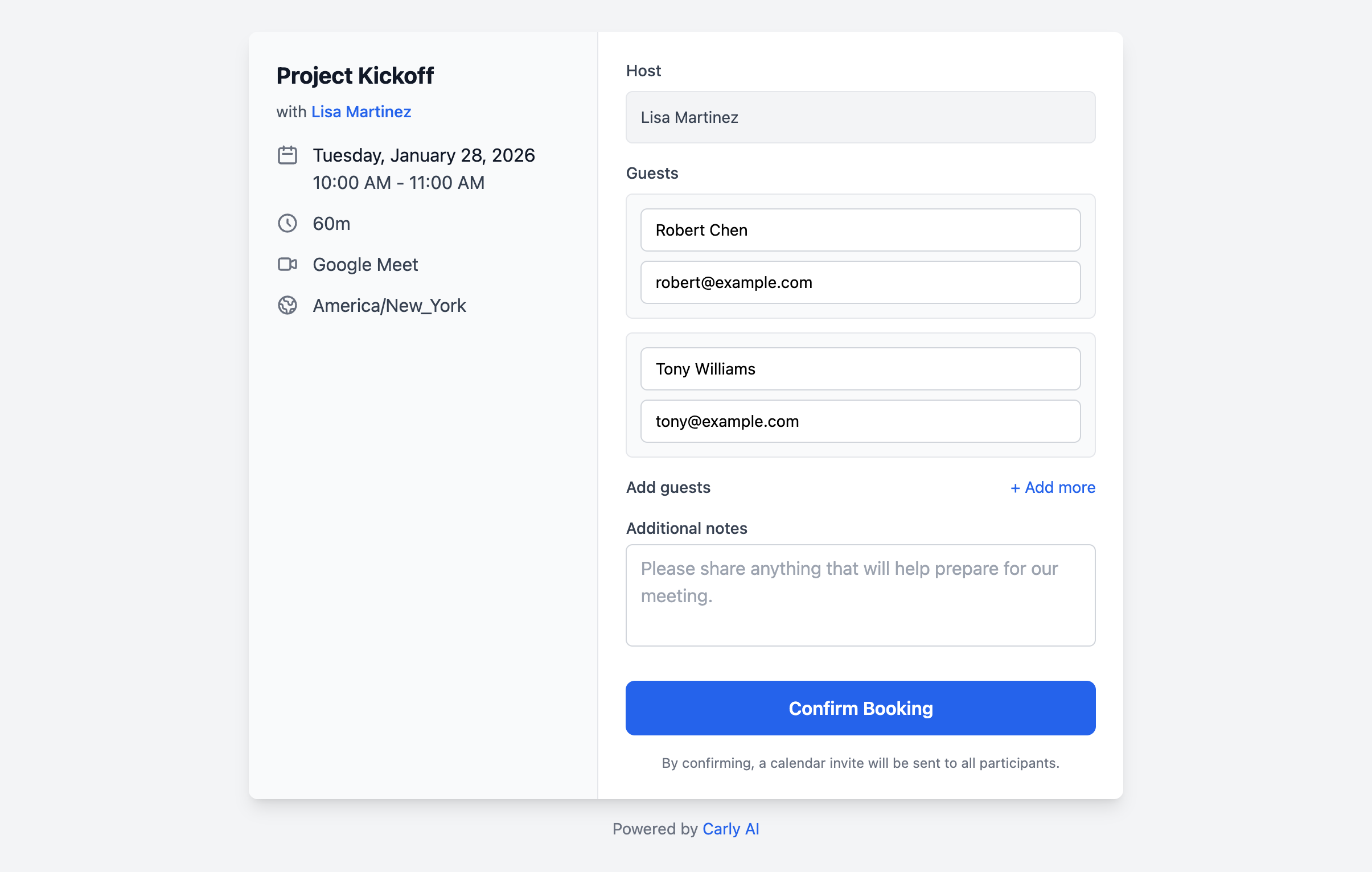
The booking page shows:
- Meeting details on the left: title, host, date/time, duration, video call info, and timezone
- Booking form on the right: confirm your name, see other guests, add additional guests, and include notes
One click to confirm. The meeting is added to everyone's calendar automatically—host and all guests receive calendar invites instantly.
Smart Features Built In
1. Works with All Calendar Accounts
Click-to-Book works with both Google Calendar and Microsoft Outlook:
- Google Calendar users: Full support with Google Meet video links
- Outlook users: Full support with Microsoft Teams video links
- No third-party calendar apps required—just your existing calendar
2. Multiple Attendees Support
Unlike traditional booking links, Click-to-Book handles group meetings:
- All attendees from the email thread are pre-filled on the booking page
- Recipients can add additional guests before confirming
- Everyone receives calendar invites automatically
3. Automatic Conflict Checking
Before showing the booking page, Carly checks if the time is still available:
- If someone else booked the slot, you'll see a "Time No Longer Available" message
- No double-bookings or calendar conflicts
- Automatically suggests trying another option from the email
4. Professional Booking Experience
Recipients see a clean, modern booking page:
- Meeting details clearly displayed (title, host, time, duration, location)
- Simple form to confirm name and add notes
- Option to add additional guests
- Mobile-friendly design
Getting Started with Click-to-Book
Requirements
Click-to-Book is available for all Carly users with a connected calendar:
- Google Calendar — fully supported
- Microsoft Outlook — fully supported
Works for both one-on-one meetings and group meetings with multiple recipients.
Enabling Click-to-Book
- Log in to your Carly dashboard
- Go to the Advanced tab
- Find "Clickable Event Links"
- Toggle it ON
That's it! Now when you CC Carly ([email protected]) on emails requesting meetings, the proposed times will include clickable booking links.
After Booking: Reschedule or Cancel
Once a meeting is booked, recipients see a confirmation page with options to manage the meeting:
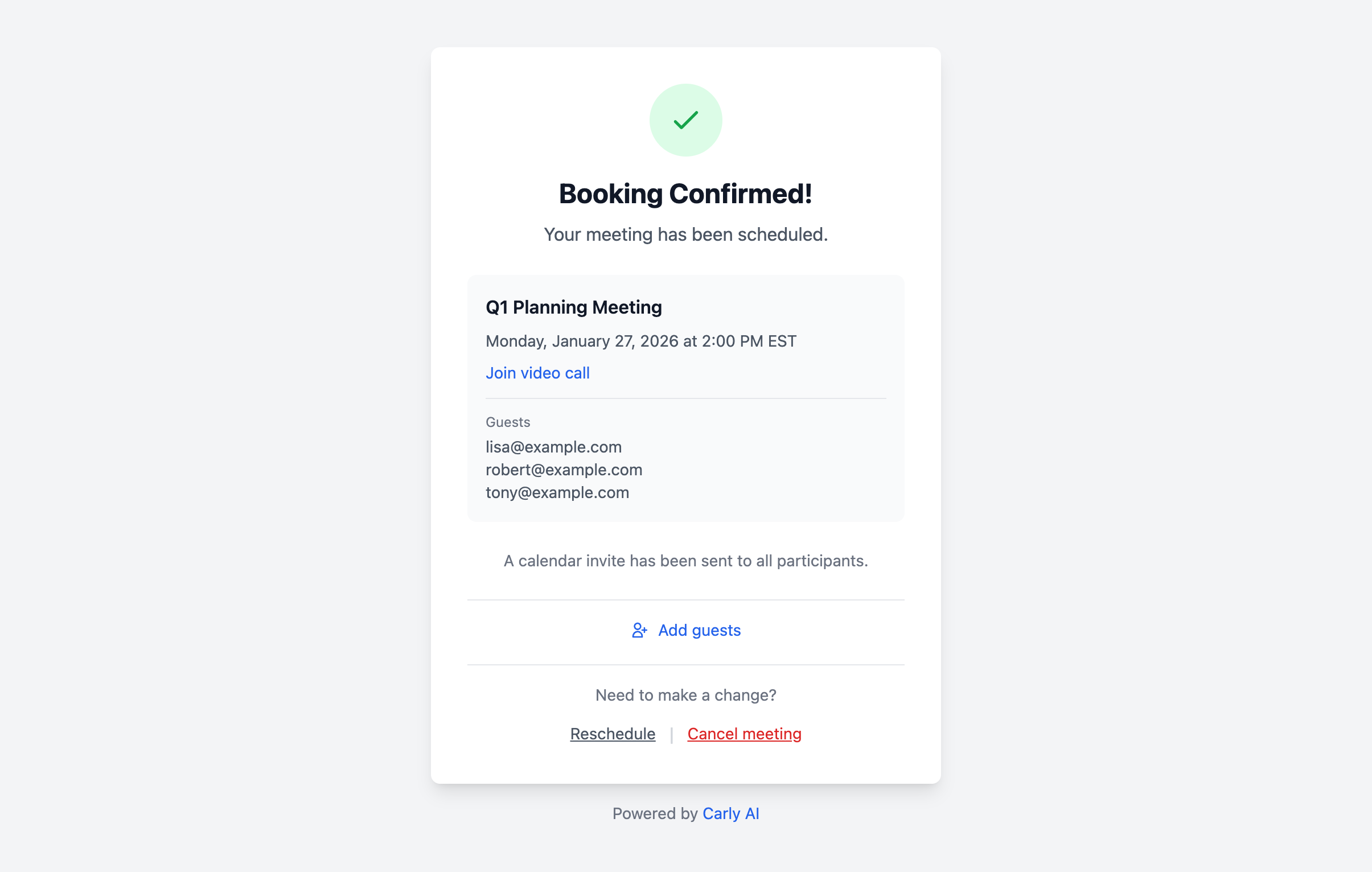
From here, they can:
- Add more guests to the meeting
- Reschedule by replying to the email thread
- Cancel the meeting with one click
Try It Today
Already a Carly user? Click-to-Book is available now:
- Enable in Advanced settings: Visit your dashboard → Advanced → Toggle "Clickable Event Links" ON
- CC Carly on your next scheduling email: [email protected]
- Watch the magic happen: Proposed times will be clickable booking links!
Not using Carly yet? Sign up and start scheduling meetings with one click.
Have feedback on Click-to-Book? We'd love to hear it! Email us at [email protected].
FAQ
Q: Does this work in all email clients? A: Yes! The clickable links work in Gmail, Outlook, Apple Mail, and any email client that supports HTML emails. The links open a web-based booking page that works on any device.
Q: What calendars are supported? A: Click-to-Book works with both Google Calendar and Microsoft Outlook. Whichever calendar you have connected to Carly, the booking links will work.
Q: What if Carly proposes a time that's no longer available? A: When someone clicks a booking link, Carly automatically checks if the time is still free. If there's a conflict, they'll see a "Time No Longer Available" message and can try another option from the email.
Q: Does this work for group meetings? A: Yes! Click-to-Book works for meetings with any number of attendees. All recipients from the email thread are pre-filled on the booking page, and guests can add additional attendees before confirming.
Q: Can recipients add extra guests to the meeting? A: Yes! The booking page has an "Add guests" option where recipients can include additional attendees who weren't on the original email thread.
Q: Can I disable this feature? A: Yes! Just go to your dashboard Advanced tab and toggle "Clickable Event Links" OFF. Carly will go back to the standard scheduling flow where recipients reply to confirm.
Q: What happens after someone books? A: After confirming, everyone receives calendar invites automatically. The confirmation page also shows options to reschedule or cancel the meeting if needed.
Ready to Save Time on Scheduling?
Join the future of work with Carly AI for calendar management.
Related Articles
New: Availability Polls and Multi-User Scheduling
Carly can now create group availability polls and coordinate across multiple calendars. Here's what's new.